Build a separate vertical timeline and treat reframing as an edit. Hold a stable composition through each thought, then make deliberate changes at meaningful cuts.
The crop is a storytelling decision
A two-person landscape interview can fit both faces comfortably. A 9:16 crop may fit only one, so the vertical version needs choices: whose reaction matters, whether a gesture belongs in frame, and where captions can sit. Centering the original image is rarely enough.
Duplicate your finished timeline before changing its dimensions. Keep the landscape master as a reference and create a vertical delivery version, commonly 1080 × 1920 when the destination accepts it. Match the intended frame rate. A different canvas does not require a different playback speed. Automated subject tracking can assist with positioning, but it cannot decide whether an interviewer’s reaction or a product demonstration should replace the current speaker.
Calculate how much picture you will keep
A full-height 9:16 window inside a square-pixel 1920 × 1080 landscape image is about 607.5 pixels wide. That is roughly 31.6% of the original width. Scaling that crop to 1080 pixels wide enlarges the source detail. A 3840 × 2160 recording gives roughly 1215 pixels across the same full-height vertical crop, offering more room for a 1080-wide output.
These are geometry calculations, not quality guarantees. Focus, compression and motion blur still matter. Inspect the source at the intended crop before assuming 4K will look sharp. If the shot cannot carry a tight crop, consider a designed layout with the landscape frame inside the vertical canvas and a useful title or caption area. Do not stretch the image to fill the shape.
Mark shots that need a different treatment
Watch the landscape cut once without adjusting anything. Add markers for a speaker change, a meaningful reaction, a hand gesture, an object demonstration and each wide establishing shot. Decide whether each moment works as a close crop, a new shot, a split layout or a landscape inset.
For a single speaker, leave looking room in the direction of their eyeline. Keep enough headroom that natural movement does not cut into the hair. If the person points toward something outside the crop, either reveal the object or choose a shot where the explanation still makes sense. An interview is not improved by hiding the thing being discussed. Reframing should preserve the information that made the original cut useful.
Position the shot before animating it
- Open the vertical timeline and choose the scaling mode that fills the frame without distorting the source.
- For each shot, adjust horizontal position first so the intended subject sits comfortably in the crop.
- Scrub to the widest gesture and largest lean within the shot. Check whether one stable position covers them.
- Only add position keyframes when the subject actually leaves the usable area or the story needs a deliberate move.
- Make the adjustment over a meaningful interval and watch at normal speed, not only frame by frame.
A slow, purposeful move can be less distracting than tracking every small head movement. If you must jump between two people, consider cutting at the speaker change instead of sliding rapidly across the empty middle of the landscape shot.
Keep captions and platform controls in the plan
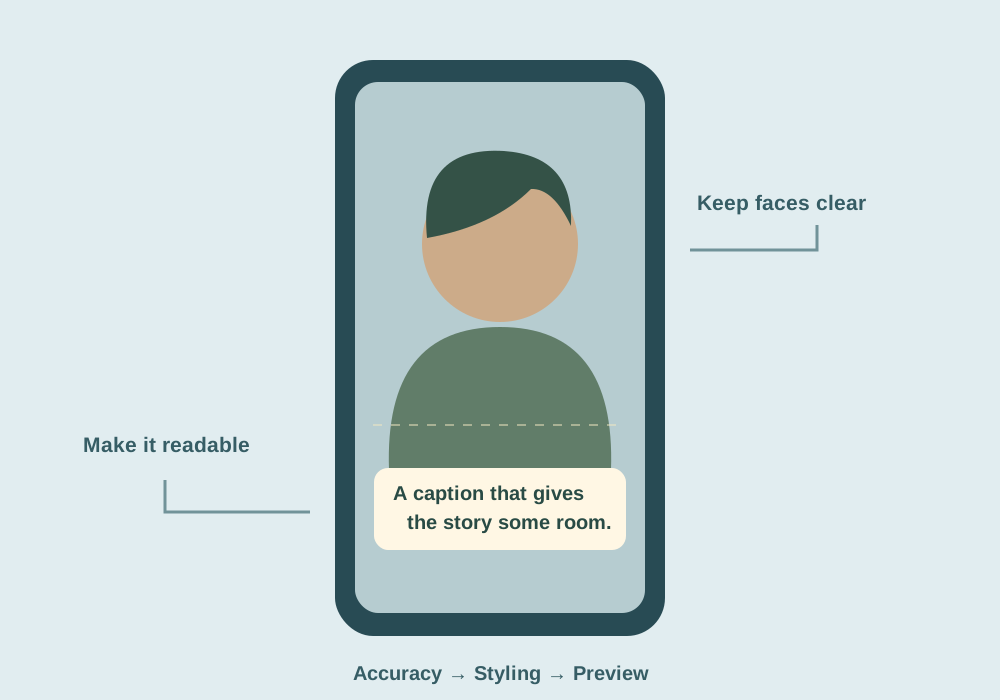
Add a temporary safe-area guide that represents the destination’s visible interface, using current platform guidance or a real draft preview. Controls and captions may cover different areas across apps and devices, so a single universal margin is unreliable.
Reformat captions after the crop. A line that worked in landscape may be too wide or wrap into three lines vertically. Use phrase-sized chunks, a readable font and a background treatment that survives bright footage. Keep captions away from eyes and the important hand or object action. Do not assume auto-caption placement adapts intelligently to every shot. Check long names, numbers and punctuation, then review the composition with captions switched on rather than as an afterthought.
Judge stability, detail and meaning separately
Export a short sequence containing a talking head, a reaction, a gesture and the busiest caption. Review it on a phone held at normal distance. Ask whether the subject remains stable, the crop retains enough detail and the scene still communicates the intended point.
| Problem | Useful revision |
|---|---|
| Constant horizontal drifting | Reduce keyframes and hold a stable composition per phrase |
| Soft close-up | Loosen the crop or use a layout that preserves more source pixels |
| Offscreen gesture or object | Use a new shot, inset or designed split layout |
| Captions obscure the face | Move and rewrap captions for that shot |
Keep the vertical timeline linked to its sources and label the delivery version. Future changes to the landscape interview may need a deliberate update in the vertical edit, particularly around speaker cuts and caption timing.
Common questions
Will auto-reframe make every landscape interview work vertically?
No. It can assist with tracking a subject, but it can still choose the wrong face or hide an important gesture. Review the result shot by shot.
Should I stretch landscape footage to fit 9:16?
No. Preserve proportions. Crop, use a suitable inset layout or choose a different source shot.
Sources & further reading
Written for ToolWillow with original explanations and examples. Consult current product documentation for controls that vary by version.